How to disassemble a Nook Simple Touch to remove or replace a battery

If your Nook Simple Touch won’t power on, or is displaying a question mark (?) on its battery indicator, I have a four things to try. But before you go to the trouble of disassembly, try charging the device with a different charger. Some chargers fit more tightly than others, and as devices like these age, they can get picky about their chargers.

If a charger change doesn’t give you an easy fix, the next step is to disassemble it, unplug the battery, wait a good 30 seconds, then plug it back in and reassemble.

You’ll need a very small slotted screwdriver or another sharp and semi-flat object, and a T5 Torx screwdriver.

Read more

SSDs, factory resets, and why you probably need encryption

After the story came out about factory resets not adequately clearing flash memory in phones and tablets, one of my college buddies asked me if a similar problem exists in SSDs.

Depending on the SSD, it definitely can.

Read more

What to do when your router isn’t in the DD-WRT router database

If you have a router and want to run DD-WRT on it, but can’t find the router in the router database, you may have learned the hard way that the router database is a couple of years out of date.

But not all hope is lost. Here’s how to find a build, if one exists.

Read more

Why shouldn’t corporations just let software auto update?

I’ve been hearing the same new idea at work for about 10 years. The idea is pretty straightforward: Since my home PC updates itself whenever it wants and I don’t have problems, why don’t we do the same thing at work so we won’t need expensive update deployment tools?

There are generally two problems with that.

Read more

How to keep Excel from dropping zeroes after the decimal point

At work part of my job is reporting security metrics along with my colleague, and sometimes we report things like the number of machines running a specific operating system. The problem we run into is that when it comes to operating system versions, OS X versions 10.1 and 10.10 are really not the same. We run into similar issues with versioning for other operating systems too, such as AIX.

To keep Excel from dropping those significant zeroes on your charts, highlight the column containing your version data and switch it from a numeric format to text format. Then switch to the tab that contains your chart, refresh the data, and your charts will show the zeroes properly.

Curing random errors when installing Office 2013

I got lots of random errors installing Office 2013 when I went to do it, including error code 112-4 and error code 0-4, and some other install errors mostly ending in 4 that aren’t documented on Microsoft’s web site. Although previously undocumented, these errors are fixable. Read more

The Altair 837016 LED outdoor fixture from Costco

My front porch lights sustained damage in a storm, so that gave me an excuse to modernize to an Altair 837016 from Costco. Priced at about $38, it has two energy-saving features: It turns itself off if it’s light outside, and it uses LEDs that deliver 950 lumens while consuming 10.5 watts.

These worked for me for about 10 years, but today there’s another option I like better that works just as well.

Read more

The missing Lenovo Thinkpad scroll lock key

The missing Lenovo Thinkpad scroll lock key

One of my coworkers accidentally enabled scroll lock on a Lenovo Thinkpad L440 the other day, which is bad news when you do it accidentally and can’t find the missing Thinkpad scroll lock key. Read more

Google’s migrating corporate apps to the cloud is less crazy than it sounds

Google is moving its corporate applications to the Internet. A year ago I would have said that’s the dumbest thing I ever heard. Today I’m not so sure.

Sticking stuff in the cloud is the popular answer to everything these days, and I just see the cloud as the new mainframe. It’s not a solution so much as a different take on the same problem, and while I see a couple of potential disadvantages, believe it or not I see some real advantages to the approach as well.

Read more

The difference between the TP-Link TL-WR841N and TL-WR841ND

The difference between the TP-Link TL-WR841N and TL-WR841ND

I see people asking about the difference between the TP-Link TL-WR841N and TL-WR841ND (sometimes they just ask TP-Link TL-WR841N vs TL-WR841ND). Since nobody else seems to have answered, I’ll take the question.

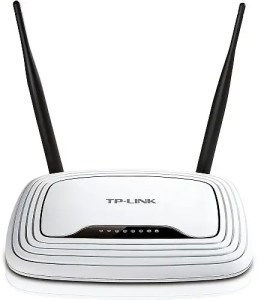
TP-Link TL-WR841n
This is the TP-Link TL-WR841n.

Here’s how to decode TP-Link model numbers. This is true of the 841 series, which is my go-to for the moment when I need a capable yet inexpensive router, but also other TP-Link models.

“TL” stands for TP-Link. “WR” stands for wireless router. The numbers tell you where the model stands in the product line. Beefier routers have larger numbers. “N” stands for the type of networking, which, in this case, is 802.11N. “D” stands for detachable antennae.

If you don’t need to be able to detach the antennae to replace them with bigger, longer-range models, you can save some money by buying the N-model. Otherwise, the TL-WR841N and TL-WR841ND are functionally identical. They both use the same DD-WRT build.